
• Products
    CHARGERS

    MX7

    MX Pro – Coming soon

    EQ7

    APPS

    Humax Charge – for drivers

    Humax Installer – for installers

  • Solutions

    For Fleet Managers
    Company car reimbursement

    For Home Users
    Smart home charging

    For Property & MDUs – Coming soon

    For Depots & Logistics – Coming soon

  • Support

    Contact Us

    App Downloads

  • About

    About Humax

    Environmental Management

    Sustainable Management

    Media

Buy Now
🌍 Global
🇬🇧 UK
🇩🇪 DE
🇰🇷 KR

General Information

  • Safety Guideline
  • Product Specification
  • Declaration of Conformity

Humax EV Home Charging

  • Installation Guide
  • User Manual
  • Getting Started
    • EQ7 – Getting Started
  • FAQ
    • MX7 FAQ
    • EQ7 FAQ

Register Support Ticket

  • Register Support Ticket
  • Contact Us
  • Model Cancellation Form

Installer Hub

  • Installation Guide
  • CT Instructions
    • EQ7 – CT Instructions
  • Wall Mounting
    • MX7 – Wall Mounting
    • EQ7 – Wall Mounting
  • Wiring Instructions
    • EQ7 – Wiring Instructions

User App Guide

  • MX7
    • Login
    • Sign up
    • Account and Profile Management
    • Charger Registration
    • Charger Network Configuration
    • Register RFID Card
    • EV Registration
    • Charging Modes
    • Charging Modes – Auto Solar Charging
    • Charging Modes – Instant Charging
    • Charging Modes – Intelligent Charging
    • Charging Modes – Charging Speed
    • Charging Modes – Schedule Charging
    • Charger Lock
    • Charger Management
    • Energy Tariff Management
    • Energy Monitoring Device Management
    • Load Balancing Settings
    • Charging History
    • Notification History
    • Settings
    • Help and Feedback
    • Firmware Update
    • Check App Version

Installer App Guide

  • MX7
    • Installer App Download
    • Charger Connection
    • Network Settings
    • Load Balancing Settings
    • LED Configuration
    • RFID Card Registration
    • Installation Info Verification
    • Installation Test
    • Ownership Transfer
    • Installation History
View Categories

EQ7 – Wall Mounting

Marking the installation site #

We’ve included an install template to help with mounting the unit.

Carefully cut out the template from the packaging box.

Please ensure a snug fit when mounting the charger on to the screw heads.
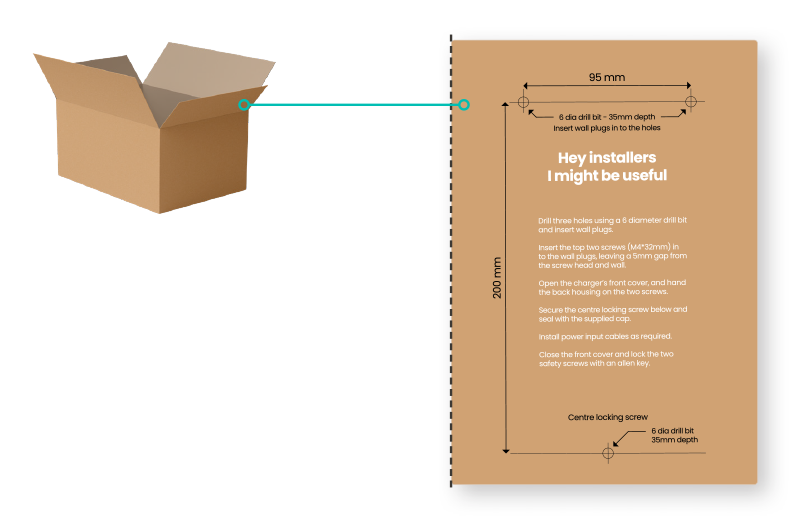
Wall Mounting Instructions

  1. Position the EV charge point between 0.5 and 1.5m above ground.
  2. Use a 6mm diameter drill bit to drill the marked three holes (35mm depth).
  3. Insert wall plugs and drive the supplied screws in the top two holes leaving a 5mm
    gap from the screw head and wall (do not overtighten).
  4. Open the charger’s front cover, and hang the back of the housing on the screws.
  5. Secure the centre locking screw and apply the rubber sealing cap.
  6. Install the power input cables + CT wiring as required.

Before you proceed #
HELP FROM THE SUPPORT HUB
Turn off the power before beginning installation.
Please follow all instructions carefully.

Download the full User Manual and watch the installation videos available at the Support Hub:
humaxcharging.com/supporthub

MX7 – Wall MountingMX7 – Wall Mounting
Table of Contents
  • Marking the installation site
  • Before you proceed
Linkedin Facebook-f Youtube
PRODUCTS
  • MX7
  • MX Pro
  • EQ7
  • Humax Charge App
  • Humax Installer App
SOLUTIONS
  • For Fleet Managers
  • For Home Users
  • Property & MDUs
  • Depots & Logistics
POLICIES & LEGAL
  • Privacy Policy
  • Open Source
ABOUT
  • About Humax
  • Environmental Management
  • Sustainable Management
  • Media
  • Contact Us
© 2026 HUMAX Co., Ltd. All rights reserved.