
Screen Overview #
Register and manage your vehicle (EV).
Registered vehicle information is used for Intelligent Charging, vehicle information-based charging approval/rejection, and charging history management.
※ Vehicle registration is possible only when EV Identification is ON.
Feature Details #
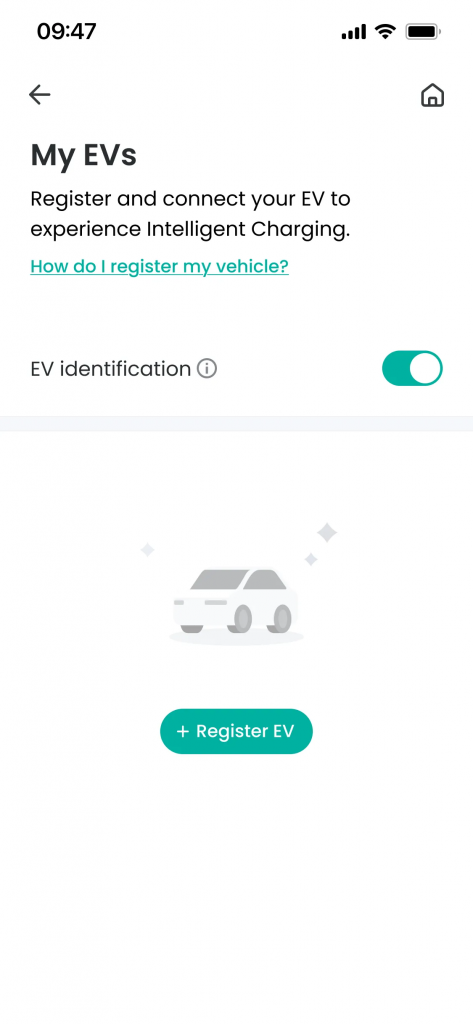
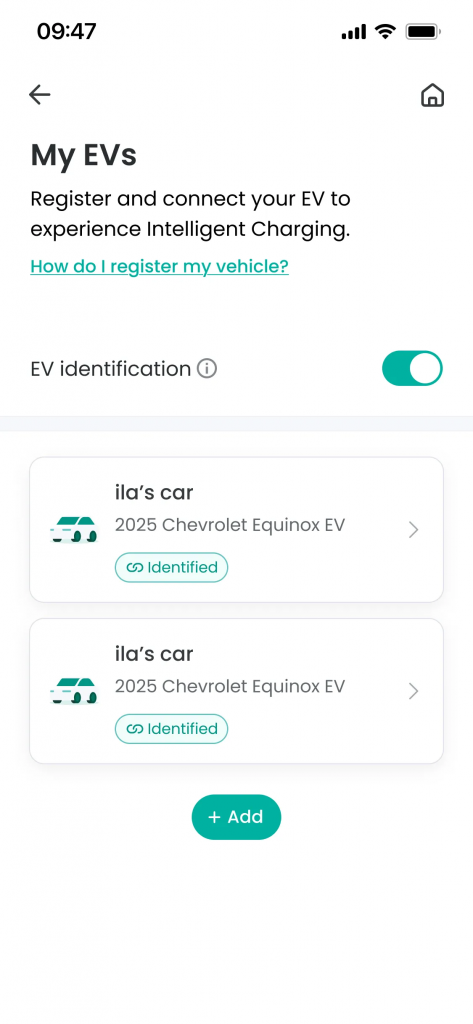
- EV Identification
Location: Toggle below guidance text
Functionality: Sets whether to use the vehicle identification feature. Vehicle registration and Intelligent Charging features can only be used when ON. When OFF, vehicle registration is not possible, and charging proceeds without vehicle distinction.
Notes: This feature may be disabled depending on some charging modes or external service linkage status. - Vehicle List
Location: Toggle below guidance text
Functionality:You can check the list of registered vehicles and detailed information for each vehicle.
Notes: If there are no registered vehicles, vehicle registration guidance is displayed. - Register Vehicle Button
Location: Below EV Identification Toggle
Functionality: You can register a new vehicle.
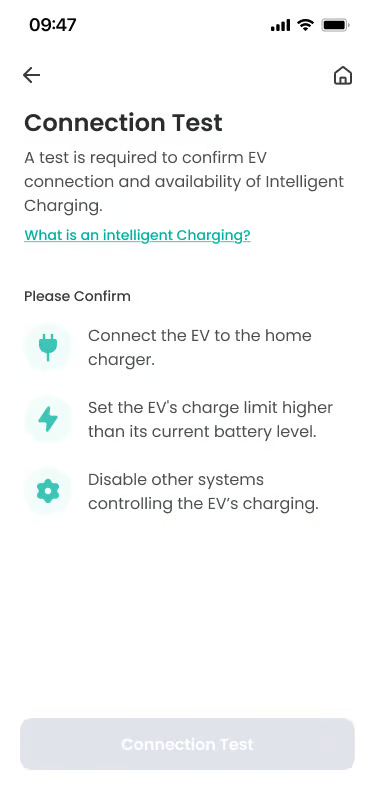
Notes: There is no limit to the number of vehicles that can be registered. - Connection Test
Location: First step of vehicle registration process
Functionality: As a mandatory step for vehicle registration, connect the charging connector to the vehicle to obtain a unique ID value that can distinguish the vehicle. If it is a UK service country, it moves to the vehicle information inquiry step, and for other countries, it moves to the vehicle information input screen.
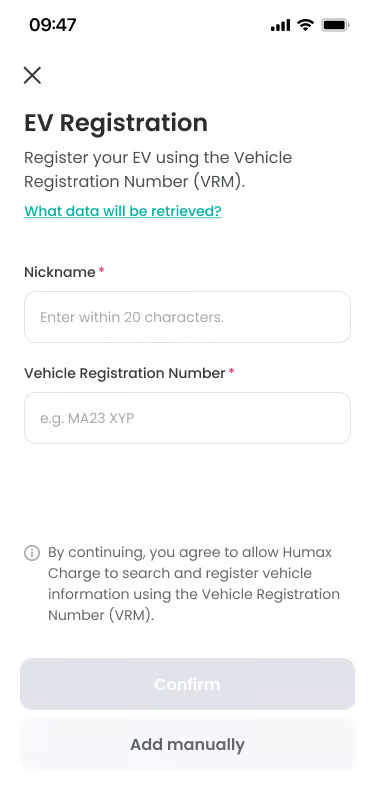
Notes: If the connection test fails, you cannot register the vehicle. - Vehicle Information Inquiry (UK Only)
Location: After successful Connection Test
Functionality: Inquire vehicle information using the Vehicle Registration Mark (VRM), and register the vehicle based on the inquiry result.
Notes: Vehicle information inquiry feature is provided only in supported countries (e.g., UK). - Enter Vehicle Information
Location: After successful Connection Test
Functionality: Directly enter and register vehicle information. You must enter nickname, brand name, model name, and battery capacity (kWh), and battery capacity is used as reference data for intelligent charging.
Notes: The register button is activated only when all required items are entered.
Specific Scenarios #
- EV Identification ON status
Vehicle identification feature is activated.
→ Vehicle registration is possible.
→ Upon charging, the unique vehicle ID is checked to identify the vehicle. If an unregistered vehicle is charged, guidance on approval of unregistered vehicle charging is provided.
→ Charging history is managed based on the unique vehicle ID.
→ Intelligent Charging feature can be used. - EV Identification OFF status
Vehicle identification feature is deactivated.
→ Vehicle registration is not possible.
→ Charging starts without identifying the vehicle upon charging.
→ All charging sessions are recorded as ‘Unknown’ vehicle.
→ Intelligent Charging feature cannot be used. - Connection Test Failed
Case where communication between vehicle and charger is not normal.
→ Check if the charging connector is correctly connected to the vehicle.
→ If the test fails repeatedly, vehicle registration is not possible.
→ In this case, you must set EV Identification to OFF and then use charging.
Technical Details #
- Battery size information is used as input value for the Intelligent Charging algorithm.
- If charging starts with EV Identification activated, the charging session is mapped to the corresponding vehicle by comparing and verifying the vehicle information received from the charger and the vehicle information registered on the server.
FAQ #
- Q. What information is retrieved by Vehicle Registration Mark?
A. Vehicle model information, etc., is retrieved through the country-specific vehicle database. - Q. Is vehicle registration possible in this way in all countries?
A. No. Inquiry based on Vehicle Registration Mark is supported only in some countries (e.g., UK).
