
Screen Overview #
Charging speed can be changed on the bottom left of the main home screen or in the charging mode setting screen.
The higher the number, the faster the charging speed.
Feature Details #
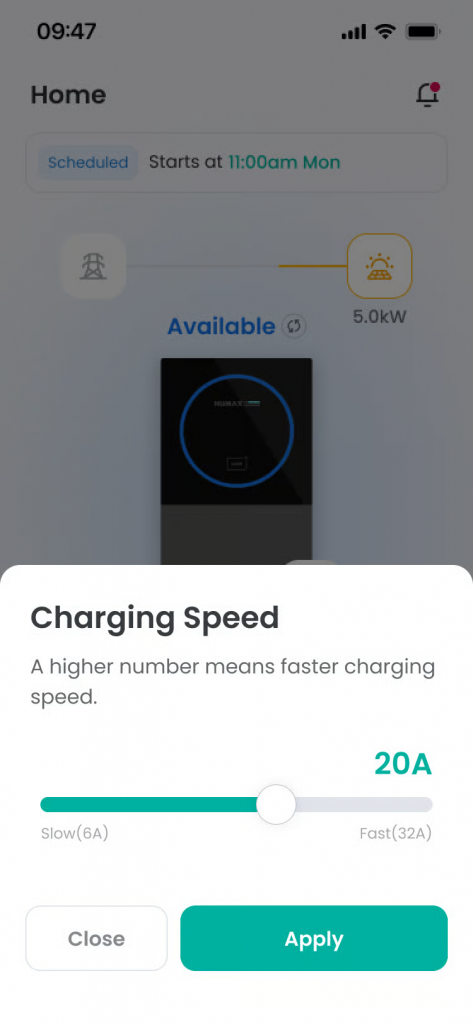
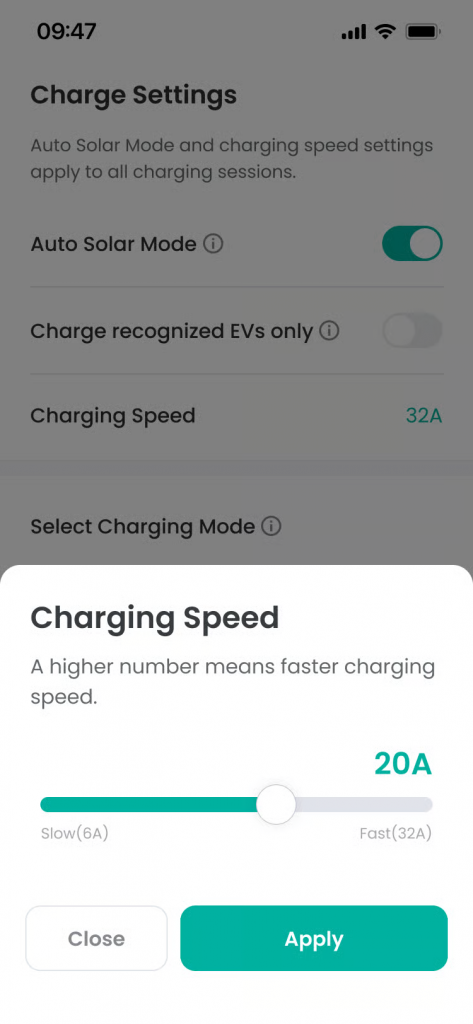
- Charging Speed Setting Bar
Location: Center of screen
Functionality: You can set the charging current (A) by scrolling left and right. The set A value is exposed above where the bar pointer is located.
Notes: Default value is set to Max, and can be set between MIN (6A) ~ MAX (Charger maximum current). - Close Button
Location: Bottom left
Functionality: Closes the modal without saving changes.
Notes: Changed values are not applied. - Apply Button
Location: Bottom right
Functionality: Saves the set value and closes the modal. A toast message is displayed upon application completion.
Notes: The button is activated only when changed to a value different from the existing set charging speed value. Changed charging speed is applied immediately.
Additional Info #
- Charging speed cannot be changed during intelligent charging.
- The MAX value of charging speed setting range is determined by the rotary switch value set in the charger hardware. (In the app, you cannot select a current value exceeding the charger HW setting.)
