
Screen Overview #
In Charging Mode settings, you can select and manage charging methods according to the user’s charging purpose and situation.
It provides various charging modes such as Instant Charging, Schedule Charging, and Intelligent Charging.
Charging Settings & Modes #
Feature Details #
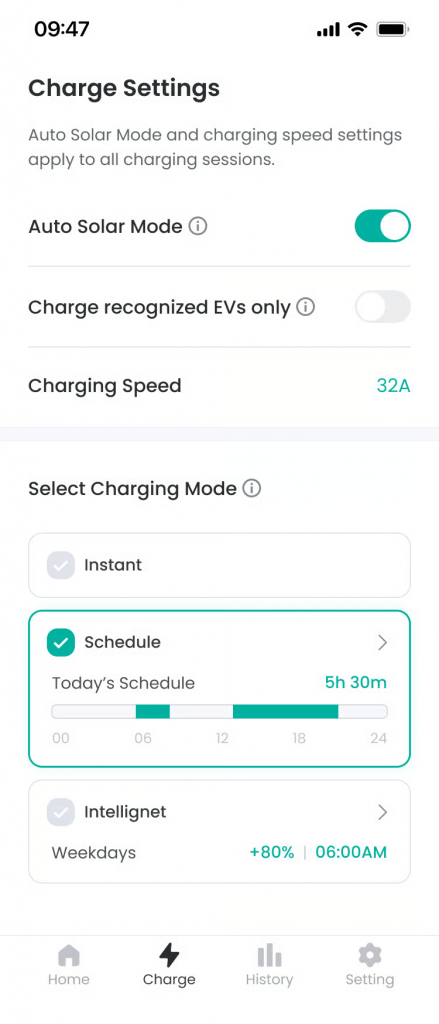
- Auto Solar Charging
Location: Toggle at top of screen
Functionality: This is a feature that automatically adjusts charging speed according to solar power generation or charges in an eco-friendly way using only surplus power.
Notes: Even if not charging, if the connector is connected to the vehicle, charging proceeds if surplus solar energy of 6A or more is generated, regardless of the mode. - Charging Speed Setting
Location: Mode selection list
Functionality: Starts charging at the set speed immediately upon connector connection without separate conditions.
Notes: Charging ends upon connector disconnection, Stop button in app, or RFID tagging. - Instant Mode
Location: Mode selection list
Functionality: Starts charging at the set speed immediately upon connector connection without separate conditions.
Notes: Charging ends upon connector disconnection, Stop button in app, or RFID tagging. - Schedule Mode
Location: Mode selection list
Functionality: Reserves charging to proceed only during the time range set by the user. Suitable for utilizing cheap time zones such as late-night electricity.
Notes: Even if the connector is connected to the vehicle before the set scheduled time, charging via grid energy does not start. - Intelligent Mode
Location: Mode selection list
Functionality: Comprehensive analysis of vehicle battery capacity, target charge amount, and electricity tariff information to automatically charge at the cheapest and most efficient time.
Notes: To use, vehicle registration (EV) and tariff setting (Energy Tariff) must precede. If EV Identification status is OFF, this feature cannot be used.
Specific Scenarios #
- Mode Change and Application
Process of selecting and applying the desired charging mode.
→ Tap the desired mode (Instant, Schedule, Intelligent) from the list to apply immediately.
→ If the connector is connected to the vehicle, mode change is not possible.
→ If conditions are not met (e.g., schedule not set, vehicle not registered, etc.), a popup inducing movement to the corresponding information setting screen is displayed.
FAQ #
- Q. When is it good to change the charging mode?
A. Please change when the charger connector is not connected to the vehicle. - Q. Can I use multiple charging modes at the same time?
A. No. You can only select one charging mode at a time. - Q. Does the existing setting disappear if I change the charging mode?
A. Setting values for each mode are maintained, and if you select that mode again, previous settings are applied.
