
Screen Overview #
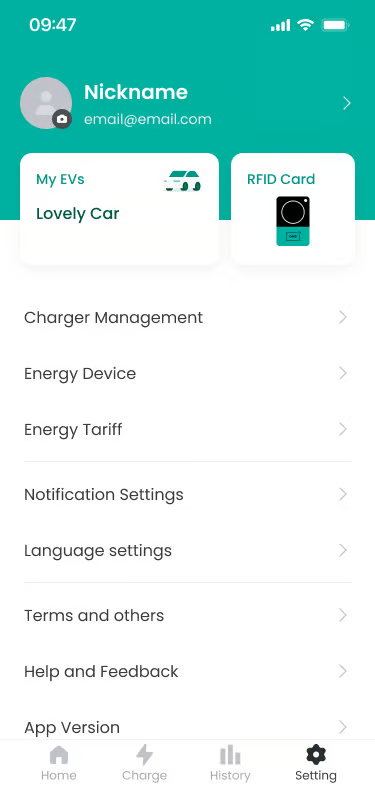
If you tap the nickname area at the top of the Settings screen, a screen where you can check and modify registered account information is provided.
Feature Details #
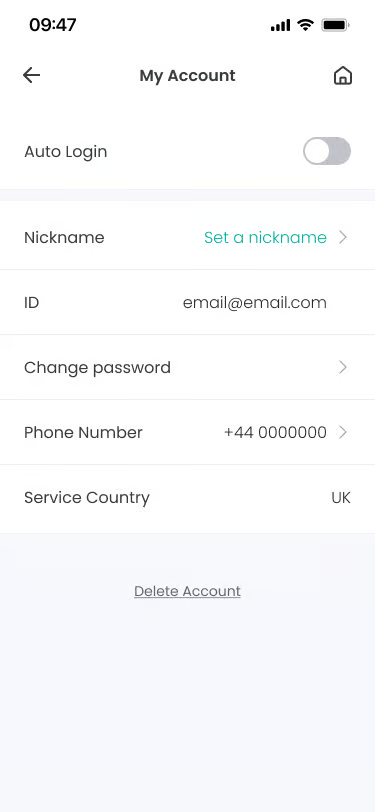
- Auto Login
Location: Top of Account Settings
Functionality: This is a feature to maintain login status without having to log in every time the app runs. You can turn it ON/OFF with the toggle switch.
Notes: If you do not use the app for 21 days, Auto Login is turned OFF and you are logged out. - Nickname
Location: Profile Information Area
Functionality: Set the nickname to be displayed within the app.
Notes: Up to 20 characters can be entered. - Email ID
Location: Below Nickname
Functionality: Check the registered email information.
Notes: Displays the email address registered at sign-up. As a unique identifier, it cannot be modified. - Change Password
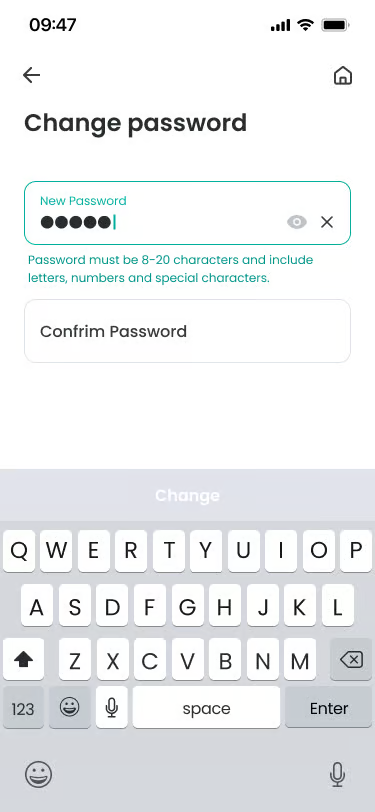
Location: Below Email ID
Functionality: Change the account password. The process proceeds by verifying the current password and then setting a new password.
Notes: When registering a new password, the new password and confirmation input must match. - Mobile Phone Number
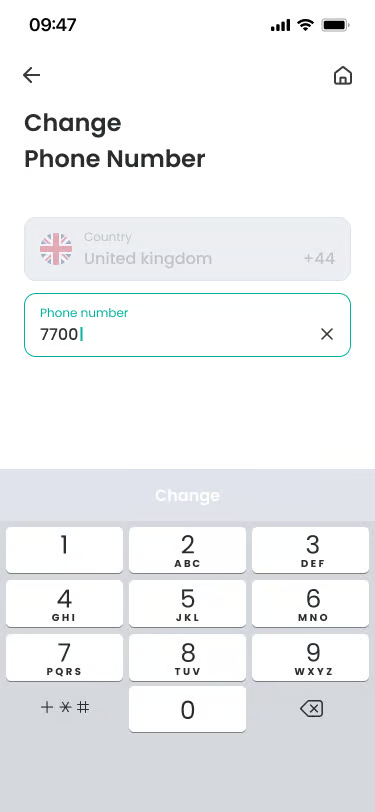
Location: Below Change Password
Functionality: You can change the registered mobile phone number. Enter and save the new number.
Notes: Country information cannot be changed. - Service Country
Location: Below Mobile Phone Number
Functionality: Information on the country where the service is being used.
Notes: Information set at sign-up cannot be changed. - Membership Withdrawal
Location: Bottom of screen
Functionality: Terminate the service usage contract and delete the account. Personal and device setting information registered in the withdrawal target country is permanently deleted. You can withdraw the withdrawal request by contacting the customer center before 14 days.
Notes: Based on the deletion target country, the member account is switched to a withdrawal pending state for 14 days from the time of withdrawal request.
Specific Scenarios #
- Cancel Password/Mobile Number Change
Action when attempting to leave the screen while changing information.
→ If there is content being written, a reconfirmation guidance popup is displayed.
→ If “Yes” is selected, changes are not saved and it returns to the previous screen. - Membership Withdrawal Policy
Terms/policy agreement process proceeds during sign-up and withdrawal due to GDPR regulation application.
→ This is an important requirement for GDPR compliance based on UK and EU.
→ Membership withdrawal is only possible when the charger connector is not connected to the vehicle, and charger factory reset proceeds immediately upon withdrawal request.
→ Re-registration is possible after membership withdrawal is complete.
FAQ #
- Q. Can I change my email (ID)?
A. For security and account identification, the email address registered at sign-up cannot be changed. - Q. I want to change the service country.
A. The service country cannot be changed directly within the app. - Q. Is re-registration possible after membership withdrawal?
A. Yes, it is possible. However, upon withdrawal, all data of the previous account is deleted and cannot be recovered, and it is processed as a new sign-up.
