
Screen Overview #
This is a History screen where the installer can check all charger installation history by month.
You can inquire about installation records conducted by the installer themselves, and easily check installation history for each period.
Feature Details #
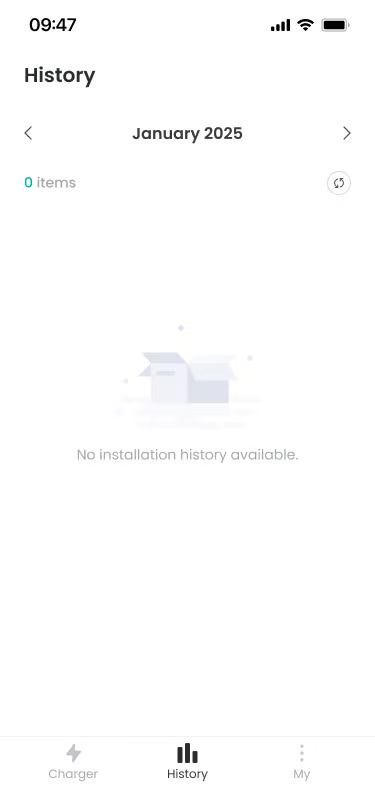
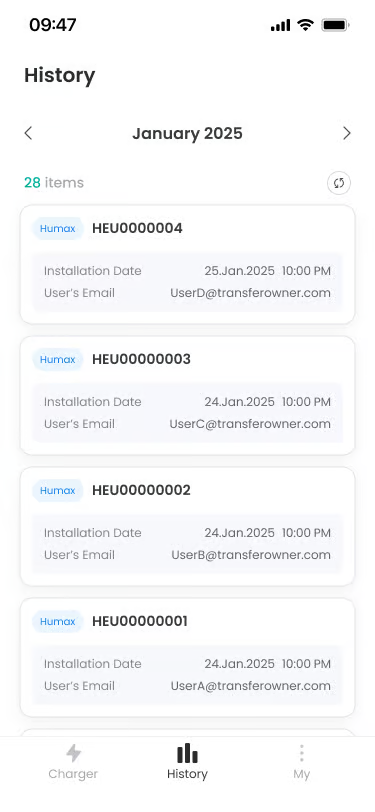
- Month/Year Selection Navigation
Location: Top of screen
Functionality: Inquires installation history for that period by selecting specific month and year by pressing left/right arrow buttons.
Notes: Displayed in “January 2025” format, and there are left/right arrow buttons. - Item Count Display
Location: Below Month/Year Selection
Functionality: Displays the number of installation history items for the currently selected month.
Notes: Displayed in “10 Items” format. - Installation History Card
Location: Below Item Count Display
Functionality: Displays each installation history in card form.
Notes: Only charger history installed by oneself is provided. - When History Does Not Exist
Location: Center of screen
Functionality: Displayed when there is no installation history in the selected month.
Notes: “No installation history available.” message is displayed in the center.
Additional Info #
- Auto Save: All installations are automatically saved to records upon completion.
- Permanent Storage: Installation history is permanently stored and cannot be deleted.
FAQ #
- Q. Installation history is not displayed.
A. Check internet connection and try refreshing. There may be no installation history in that month. - Q. Can I delete installation history?
No, installation history cannot be deleted for record preservation.
