
Screen Overview #
Execute tests to check if the charger operates normally before completing installation.
You can perform simple charging start/stop tests through Quick Test.
Also, the provided Recovery (Factory Reset/Reboot) function is a recovery option available when charger problems occur.
Feature Details #
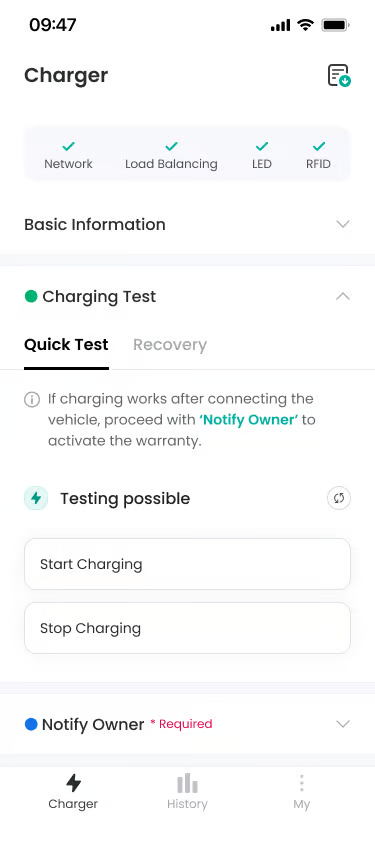
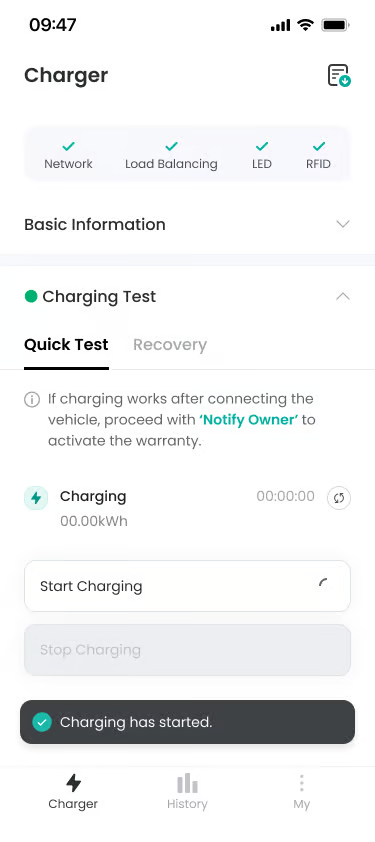
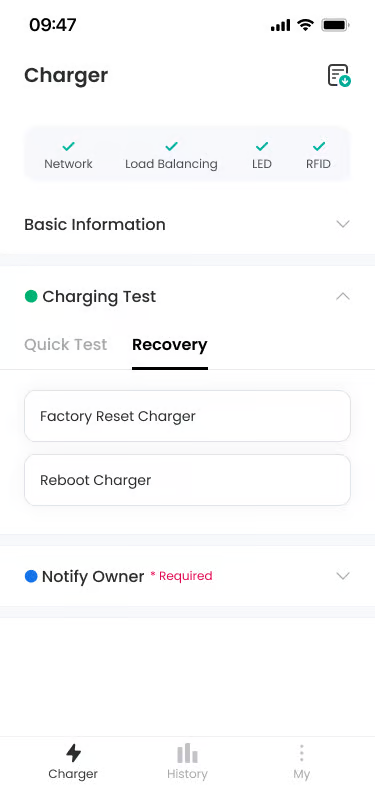
- Charging Test Section
Location: Below Basic Information Section
Functionality: Accordion section to proceed with charging test. Provides two tabs: Quick Test and Recovery.
Notes: Indicates it is optional with a green dot, and two tabs (Quick Test, Recovery) are displayed when expanded. - Quick Test Tab
Location: Within Charging Test Section
Functionality: Proceeds with charging test using actual vehicle. Start/stop cycle test using actual vehicle is recommended.
Notes: Default selected tab, button is activated/deactivated depending on Testing not possible or Testing possible status. - Recovery Tab
Location: Within Charging Test Section
Functionality: Provides options to factory reset or reboot the charger.
Notes: Located next to Quick Test tab, Factory Reset Charger and Reboot Charger options are displayed when clicked. - Start Charging Button
Location: Within Quick Test Tab
Functionality: Button to start charging.
Notes: Displayed with black text on white background when activated, displayed as inactive when command is being delivered or in charging impossible state. - Stop Charging Button
Location: Within Quick Test Tab, Below Start Charging Button
Functionality: Button to stop charging.
Notes: Displayed with black text on white background when activated, displayed as inactive when command is being delivered or in charging impossible state. - Charging Status
Location: Within Quick Test Tab
Functionality: Displays charging in progress status. Displayed after charging starts and shows elapsed time and energy amount.
Notes: “Charging” text is displayed with green check icon, and charging time and energy amount are displayed on the right.
Additional Info #
- Quick Test Recommendation: Proceeding with charging test after connecting actual vehicle is recommended, or optional.
- Testing possible Condition: Switches to Testing possible when charger is normally connected to server.
- Factory Reset Caution: Factory reset deletes all setting information (network configuration, RFID card) stored in the charger, so use carefully.
- Factory Reset Duration: Factory reset takes about 1~2 minutes, and charger reboots.
FAQ #
- Q. It does not change from Testing not possible to Testing possible.
A. Please check if the charger is normally connected to the server. - Q. I pressed Start Charging but charging does not start.
A. First check if “Start charging command sent.” toast is displayed. If toast is displayed but charging does not start, check vehicle’s charging port status and charger’s power supply. - Q. Do I need to perform a charging test?
A. It is recommended but not mandatory. If you proceed with charging test with actual vehicle, you can check if installation is done correctly. You may proceed directly to the Notify Owner step.
