
Screen Overview #
Intelligent Charging is a feature that automatically adjusts the charging time to charge considering power rates and charging environment when the user sets departure time and required charge amount.
※ Available only when EV Identification is ON, EV registration is complete, and Energy Tariff registration is complete.
Feature Details #
- Schedule List
Location: Center of screen list
Functionality: You can check the list of registered intelligent charging schedules. In each schedule, you can check applied days, departure time, and target charge amount (%).
Notes: To use Intelligent Charging Mode, at least one schedule must be registered. Default schedule is automatically provided as Weekdays / +80%. - Add Schedule
Location: + button at top of list
Functionality: Registers a new intelligent charging schedule. You can set applied days, departure time, and target charge amount (%). Up to 7 schedules can be registered, and intelligent charging operates based on activated schedules.
Notes: The system automatically calculates the charging start time so that charging is completed by the set departure time. - Modify Schedule
Location: List card
Functionality: Selecting a registered schedule card allows modifying applied days, departure time, and target charge amount (%).
Notes: If the schedule is changed during charging, it does not affect the current charging session, and the changed schedule applies from the next charging. - Delete Schedule
Location: Next to + button
Functionality: Individual schedule or all schedules deletion is possible. If all schedules are deleted, default schedule (Weekdays / +80%) is automatically provided.
Intelligent Charging Flow #
- Connect Connector and Vehicle Recognition
Location: Step 1
Functionality: If you connect the connector to the vehicle while intelligent charging is set, vehicle recognition proceeds. If recognized as an unregistered vehicle, guidance to choose charging approval or rejection is displayed.
Notes: If it is an unregistered vehicle, intelligent charging is not applied, and it switches to schedule charging flow to proceed with charging. - Create Intelligent Charging Schedule
Location: Step 2
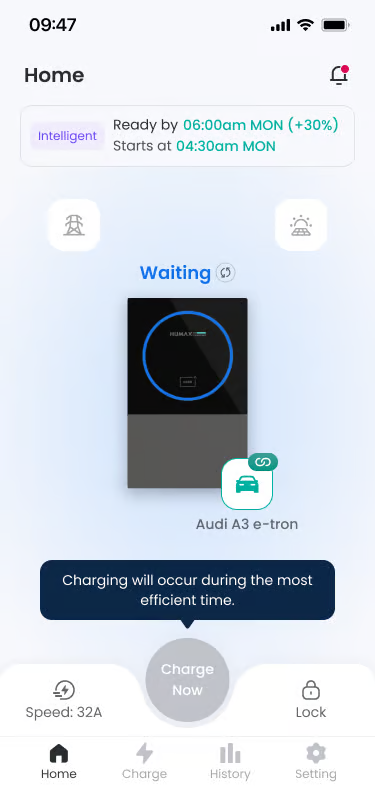
Functionality: If it is a registered vehicle, charging start time and charging schedule are automatically calculated based on vehicle information, set intelligent charging schedule, and tariff information. The screen is displayed as Waiting status.
Notes: Generated expected charging start time can be checked on the main screen. - Charging Wait Status
Location: Step 3
Functionality: Power is not supplied until the set intelligent charging start time. The user just needs to wait without separate manipulation.
Notes: Pressing the Charge Now button on the home screen allows immediate charging regardless of schedule and random delay application status. - Charging Starts at Intelligent Charging Time
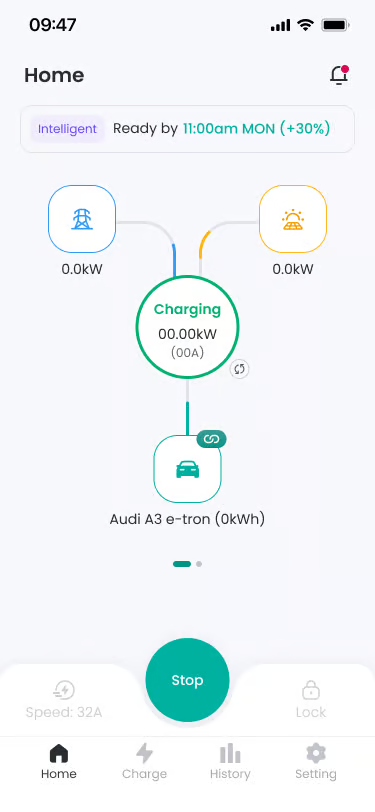
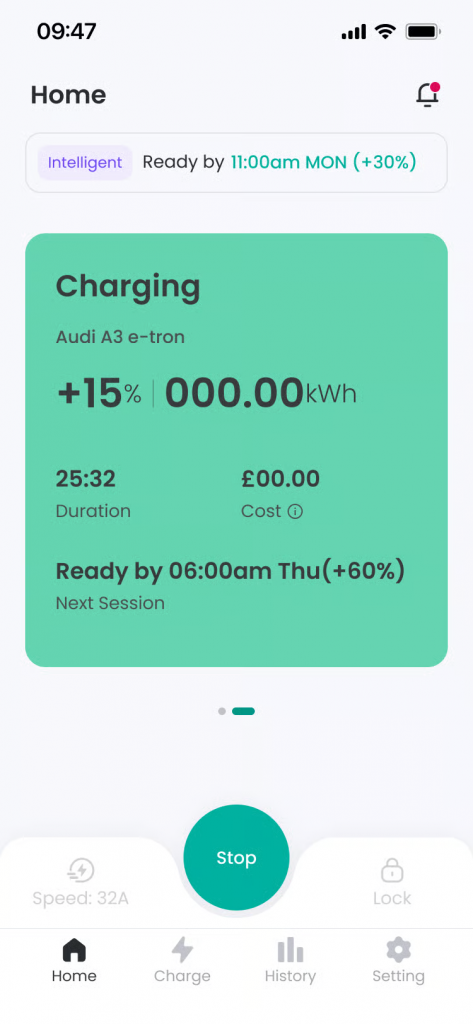
Location: Step 4
Functionality: When the set schedule start time arrives, charging starts automatically, and screen status changes to Charging. You can check real-time power information supplied from Grid and Solar.
Notes: If Random Delay function is activated, charging may start after a certain delay. - Pause Charging
Location: During charging
Functionality: According to the created charging schedule, charging may be paused after starting. After pausing, charging proceeds automatically again at the optimal time. - Charging Ends at Schedule End Time
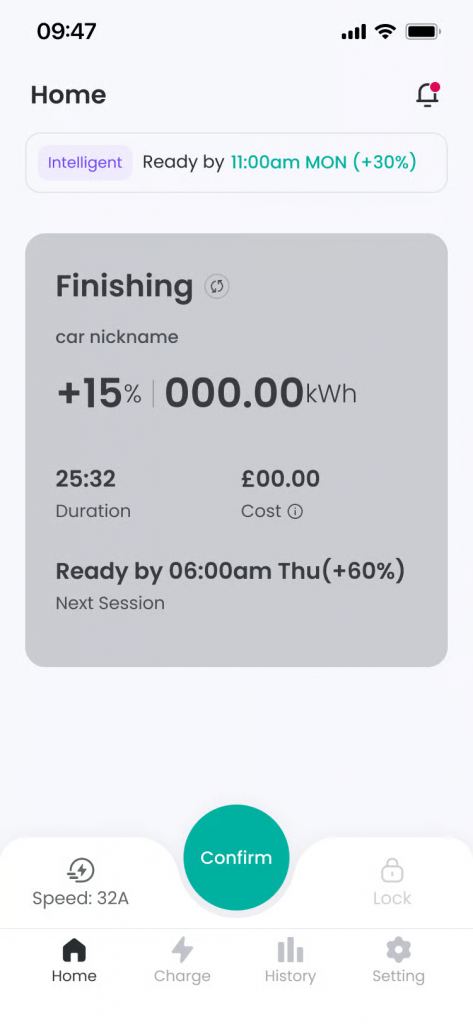
Location: Step 5
Functionality: When the schedule end time arrives, charging ends automatically and Finishing screen is displayed. Pressing the ‘Confirm’ button on the screen or disconnecting the connector from the vehicle ends the Finishing screen. - Restart Intelligent Charging
Location: After charging ends, connector not disconnected
Functionality: To use the next intelligent charging after charging ends, please disconnect and reconnect the connector.
Notes: Intelligent charging schedule is created upon connector connection.
Additional Info #
- Charging wait or pause status is not an error. During intelligent charging, charging status may change due to vehicle or power environment.
- If immediate charging is needed, you can use the Charge Now button at any time.
- If schedules overlap, duplicate guidance screen is provided, and if ‘Yes’ is pressed, the existing registered schedule is overwritten with the changed schedule information.
- Charging speed cannot be changed during intelligent charging.
FAQ #
- Q. Intelligent charging is on but charging doesn’t start immediately.
A. Intelligent charging automatically starts charging when conditions are met. Charging wait status (Waiting) is normal operation, and you can charge immediately by pressing Charge Now if needed. - Q. Intelligent charging is set in the app but charging doesn’t start.
A. If a charging schedule is set in the vehicle itself (Vehicle is in Suspended EV state), charging may not start regardless of the app’s intelligent charging settings. Please check and release vehicle schedule settings on the vehicle display or vehicle app. - Q. Charging stopped in the middle. Is it an error?
A. No. Intelligent charging may temporarily suspend charging depending on power conditions or charging environment, which is normal operation. When conditions are met again, charging resumes automatically without separate manipulation. - Q. I turned on intelligent charging, but it doesn’t start automatically again after charging ends.
A. Intelligent charging schedule is created when connecting the connector to the vehicle. To use the next intelligent charging, please disconnect and reconnect the connector. - Q. Are intelligent charging settings changes applied immediately?
A. Changed settings are applied after the current charging session ends. New settings are reflected from the next charging.
